I just noticed that RackNerd’s Black Friday 2026 KVM VPS promotional plans are out, starting at $15.98/year, with pretty solid specs and bandwidth.
While the sale just launched and stock is still available across all tiers, I put together a quick summary of the five plans for anyone who might be interested.
Black Friday 2026 Plans Overview
All five plans come with KVM virtualization, pure SSD RAID-10 storage, a 1Gbps port, and 1 dedicated IPv4 address, with full root access.
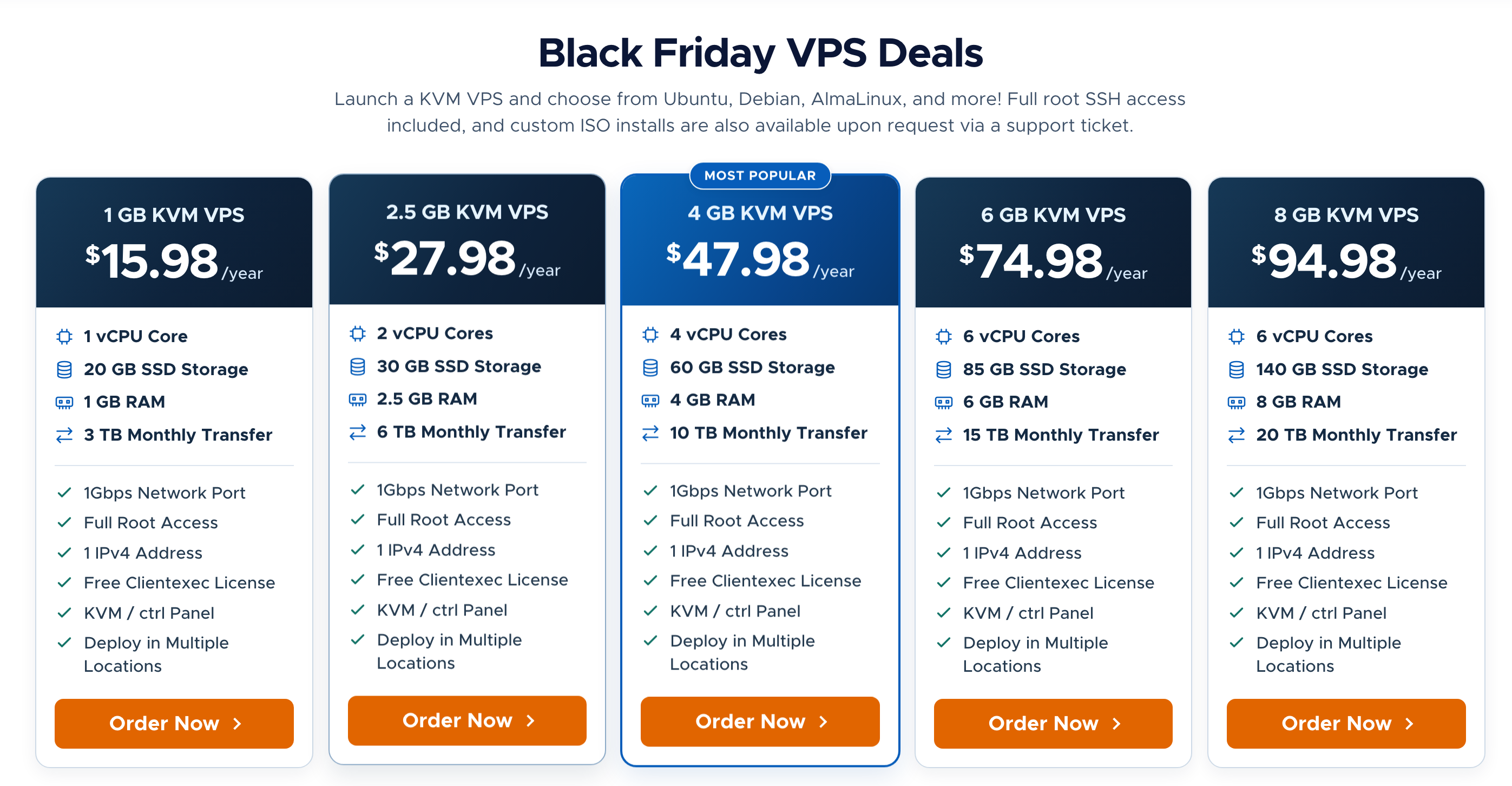
| Plan | CPU | RAM | SSD Storage (RAID-10) | Monthly Bandwidth (1Gbps) | Annual Price | Order Link (Affiliate) |
|---|---|---|---|---|---|---|
| 1 GB KVM VPS | 1 vCPU | 1 GB | 20 GB | 3 TB | $15.98/yr | View Plan |
| 2.5 GB KVM VPS | 2 vCPU | 2.5 GB | 30 GB | 6 TB | $27.98/yr | View Plan |
| 4 GB KVM VPS 🔥 | 4 vCPU | 4 GB | 60 GB | 10 TB | $47.98/yr | View Plan |
| 6 GB KVM VPS | 6 vCPU | 6 GB | 85 GB | 15 TB | $74.98/yr | View Plan |
| 8 GB KVM VPS | 6 vCPU | 8 GB | 140 GB | 20 TB | $94.98/yr | View Plan |
After ordering, you can also reply to the official promotion thread to request free double bandwidth (see details below).
Tips Before Choosing and Ordering
If this is your first time buying from RackNerd, here are a few things worth keeping in mind:
1. Choosing a Datacenter: Test Before You Buy
Available datacenter locations vary dynamically with stock across plans, so pick one based on where most of your traffic comes from:
- Primarily accessing from China: Prioritize US West Coast locations such as Los Angeles (DC-03), San Jose, and Seattle, which generally offer lower latency.
- Targeting Europe/US users or region-specific workloads: Consider locations like Dallas or New York.
Performance varies quite a bit depending on your region and ISP (China Telecom / China Unicom / China Mobile), so it’s a good idea to test the corresponding Looking Glass page before ordering:
- Los Angeles DC-03 (top pick for China): lg-lax03.racknerd.com
- San Jose: lg-sj.racknerd.com
- Seattle: lg-sea.racknerd.com
- Dallas: lg-dal.racknerd.com
- New York (for US/Europe traffic): lg-ny.racknerd.com
Testing tip: On the Looking Glass page, you can download the test files directly to check download speeds. For the Ping / Traceroute input box below, enter your current local public IP address (remember to turn off any proxy first before looking up your IP) to test the return latency and route from that datacenter back to your network.
2. Request Free Double Bandwidth After Ordering
RackNerd’s Black Friday plans this year are eligible for a free monthly bandwidth doubling by replying to the official LowEndTalk thread (for example, 3 TB becomes 6 TB, 6 TB becomes 12 TB, and so on):
- After completing payment, find your Order Number in your confirmation email or in the RackNerd client portal under
Billing → My Invoices. - Go to the official RackNerd Black Friday 2026 LowEndTalk thread (#223558) (you can register a free account with an email address if you don’t have one).
- Reply at the bottom of the thread with your order number. You can copy the template below (remember to replace the order number):
Hi Dustin, thanks for the awesome Black Friday offer! My Order Number is #YOUR_ORDER_NUMBER — please double the bandwidth. Thank you!
Once posted, just wait for RackNerd support to process it—they usually double the monthly bandwidth quota on your account fairly quickly.
3. Payment Methods, Renewals, and IP Replacement
- Convenient payment options: RackNerd accepts Alipay, PayPal, credit cards, and several cryptocurrencies, making checkout straightforward for users in China.
- Renewals: RackNerd’s Black Friday promotional plans have historically renewed at the same price, though it’s still worth verifying the billing cycle and pricing details on the checkout page before paying.
- IP replacement: Test connectivity right after provisioning. If the assigned IP is unreachable or blocked, you get 1 free IPv4 change within the first 72 hours of activation (click
Change IPon the service details page in the client portal for self-service replacement, or open a support ticket). After 72 hours, each IP change costs $3.
Final Thoughts
At around $16 a year, these servers are all about value for money and reliable basic availability. They run on standard international routes rather than premium optimized routes like CN2 GIA that cost around $100 a year. Especially during evening peak hours, you may see higher latency or slower speeds, so it’s worth setting realistic expectations before ordering.
If you’re using it for a personal blog, a dev/test environment, learning Linux, or running open-source self-hosted tools (optionally paired with Cloudflare), the price is quite reasonable and saves you the hassle of ICP domain filing. Still, if you plan to host critical data or production workloads, remember to keep regular off-site backups regardless of which VPS provider you use.